 By
By 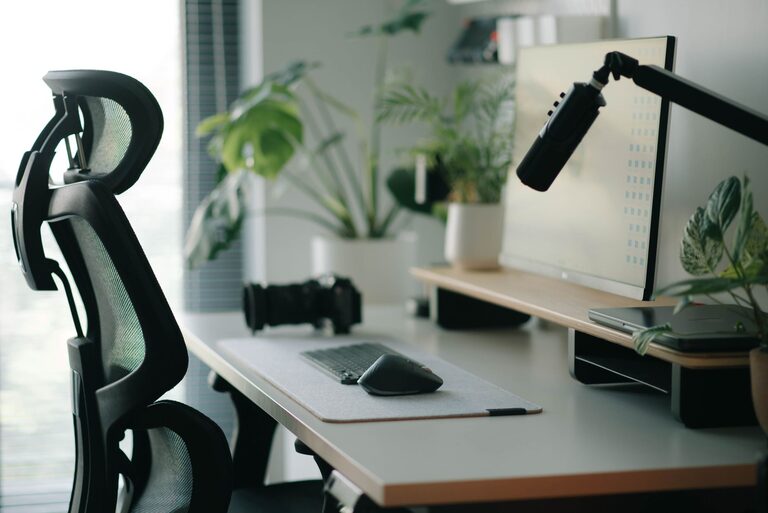
A well-planned desk setup can make work feel easier and more enjoyable. Your desk does not need to be expensive or filled with the latest accessories. Small changes to the layout, lighting, and organization can help you stay focused while making your workspace more comfortable.
Whether you work from home, study, or use a desk for creative projects, the goal is the same: create an environment that supports the way you work. Use the tips below to build a workspace that feels practical, calm, and easy to maintain.
Start With the Right Desk Location
The location of your desk affects both focus and comfort. If possible, choose a spot with enough natural light and limited foot traffic. A quiet corner can reduce interruptions, while a view of the room may help you feel more aware of your surroundings.
Avoid placing your screen directly in front of a bright window. Strong light behind the display can create glare, and direct sunlight may make the screen harder to read. A desk positioned at a right angle to the window often provides a useful balance of light without excessive reflections.
Consider the following when choosing a location:
– Distance from noisy appliances or busy walkways
– Access to power outlets
– Amount of natural light
– Available space for your chair and movement
– Room for storage or desk accessories
If you share your space with others, a small desk divider or a clear visual boundary can help signal when you need uninterrupted time.
Keep Your Screen at a Comfortable Height
Your monitor or laptop should be positioned so you can view the main part of the screen without constantly bending your neck. For many people, raising the display slightly creates a more natural viewing position.
A monitor stand, sturdy shelf, or stack of books can lift a screen to the desired height. If you use a laptop for extended periods, consider pairing it with a separate keyboard and mouse. This allows you to raise the laptop while keeping your hands at a comfortable level.
Place the screen about an arm’s length away, then adjust it based on the size of the display and your viewing preferences. The top of the screen should generally be near eye level, but the best position may vary depending on your setup and glasses.
Choose a Supportive Chair
A desk chair should allow you to sit comfortably while keeping your feet supported. Look for a chair with adjustable height and enough back support for your preferred sitting position.
When seated, aim for:
– Feet resting flat on the floor or on a footrest
– Knees positioned comfortably, without pressing against the desk
– Shoulders relaxed rather than raised
– Elbows resting naturally near your sides
– Enough room to move the chair closer or farther from the desk
You do not need a specialized chair to create a good setup. A regular chair can work well if its height and position suit your desk. A small cushion or footrest may also improve the fit.
Remember that no single sitting position works all day. Change position occasionally, stand when convenient, and take short breaks from the screen.
Improve Your Desk Lighting
Good lighting makes it easier to read, write, and use a screen without creating unnecessary glare. Natural light is useful during the day, but a desk lamp can provide more consistent illumination.
Choose a lamp that directs light toward your work area rather than directly into your eyes. If you write by hand, place the lamp on the opposite side of your dominant hand to reduce shadows. For screen-based work, position the lamp so it does not reflect off the display.
A warm or neutral light may create a relaxed atmosphere, while a brighter light can help a workspace feel more energetic. Use the setting that suits the task and the time of day.
It also helps to keep the surrounding room from being much darker than your screen. A balanced level of light can make the display feel less harsh and improve the overall comfort of the space.
Organize Items by Frequency of Use
A crowded desk can make it harder to find what you need and easier to become distracted. Instead of keeping everything within reach, divide your items into three groups:
- Items used constantly, such as your keyboard, mouse, notebook, or headphones
- Items used regularly, such as pens, chargers, and reference materials
- Items used occasionally, such as extra cables, tools, or paperwork
Keep the first group on the main work surface. Store the second group in a nearby drawer, tray, or holder. Move occasional items to a cabinet, shelf, or labeled box.
This approach keeps important tools accessible without allowing the desk to become overloaded. At the end of each work session, return items to their usual places. A quick reset can make it easier to begin the next task.
Manage Cables and Chargers
Loose cables can make a workspace look untidy and may get in the way. Start by identifying which cables you actually use. Remove extras from the desk and store them in a labeled container.
Use simple cable clips, ties, or a cable tray to guide wires along the back or underside of the desk. Keep charging cables close to the devices they serve, but avoid creating a tangled group around your main work area.
A few practical cable habits include:
– Label chargers that look similar
– Keep power strips off the main desktop
– Leave enough slack for easy adjustments
– Store spare cables together
– Check cables regularly for damage
A clean cable layout can also make it easier to move equipment or clean the desk.
Reduce Digital Distractions
A comfortable physical setup is only part of a focused workspace. Your computer and phone can also introduce interruptions. Make your digital environment support the task in front of you.
Before starting, close tabs and applications that are not needed. Use full-screen mode for writing, reading, or design work when helpful. Turn off nonessential notifications, especially those that are not connected to your current task.
Your phone can be placed across the room, in a drawer, or on silent mode during focused work. If you need it nearby, remove distracting apps from the home screen or use a temporary focus setting.
Try keeping a small notepad nearby for unrelated thoughts. Writing them down allows you to return to the main task without worrying about forgetting them.
Add Simple Comfort Features
Small details can make your desk more pleasant without taking up much space. A desk mat can create a smoother surface for your keyboard and mouse. A water bottle can help you avoid frequent trips away from your work area, while a small plant or personal item can make the space feel more inviting.
Choose accessories based on how you work, not because they are popular. Useful additions may include:
– A monitor stand with storage
– A compact desk lamp
– A footrest
– A document holder
– A wireless keyboard and mouse
– A small drawer organizer
– Headphones for quiet work
Avoid adding accessories that create more clutter than value. Every item should have a clear purpose or make the workspace more enjoyable.
Create a Reset Routine
The best desk setup is one that remains easy to use. At the end of the day, spend a few minutes clearing dishes, returning supplies, arranging cables, and preparing the space for tomorrow.
You can also review the setup every few weeks. Ask yourself:
– Is anything difficult to reach?
– Are cables getting in the way?
– Is the lighting still comfortable?
– Do I have enough clear space?
– Which items are rarely used?
Make one small adjustment at a time. A desk does not need to be perfect to work well. The most effective setup is one that matches your habits, supports your tasks, and makes it simple to begin.